
The Main Window
Everything you need sits on one face. The extra compressor controls are one click away under Advanced, and the modulators open under Automation.
Interface map
1 Hover or tap a number to see what that part does.
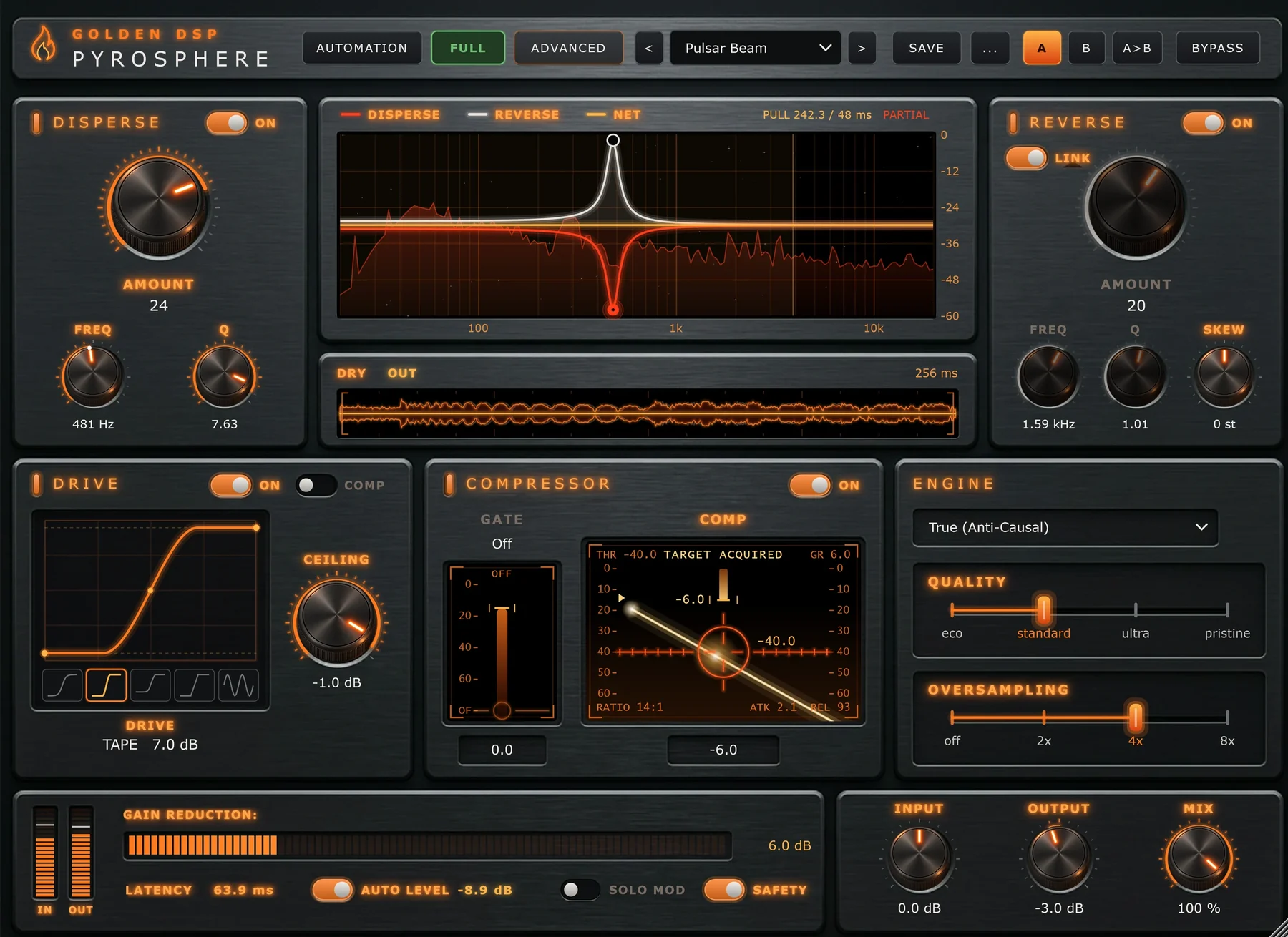
- 1Automation opens the four built-in modulators. Modulators
- 2Licence badge: Full, Trial or Locked. Click it for the licence panel. Trial and Activation
- 3Advanced opens the compressor detail and Drive's Bias. Advanced Drawer
- 4Preset browser. The < > arrows step through presets. Presets and A/B
- 5Save your own preset, and the … menu for Save As, Delete, the preset folder and Reset.
- 6A / B compare slots, and A>B to copy one into the other.
- 7Bypass turns the effect off, time-aligned with the processed sound.
- 8Disperse spreads a hit out after it lands. Disperse
- 9Phase display: both curves over a live spectrum. Drag the nodes. Phase Display
- 10Dry / Out scope: the last 256 ms of input and output.
- 11Reverse pulls energy in ahead of the hit, with Link and Skew. Reverse
- 12Drive: drag the curve for Heat, pick a shape, set Ceiling. Drive
- 13Compressor: the Gate and Comp faders. Compressor and Gate
- 14Engine: True or Live mode, Quality and Oversampling. Engine
- 15Meters, Latency, Auto Level, Solo Mod and Safety. Output and Metering
- 16Input, Output and Mix. Output and Metering
How the sound flows
Audio passes through the sections in this order. The Drive and Compressor work on the sound after Disperse has spread it out, and before Reverse gathers it back in.
The dry signal used by Mix, Auto Level, Solo Mod and Bypass is taken before the Input trim and delayed to line up exactly with the processed sound, so blending never smears the timing.
Working with the controls
Knobs
Drag up or down. Double-click to return to the default. Right-click for automation and reset options.
Faders and the Drive curve
Drag up or down, or use the mouse wheel. Hold Shift for fine control. Double-click to reset.
Switches
Click to toggle. A lit legend means the section is on. When Bypass is on, every legend goes dark.
Tooltips
Hover over any control to see what it does. Hover over a factory preset's name to read what it's for.
Window size
Drag the bottom-right corner. The whole interface scales as one piece, and it reopens at the size you left it.
Every gesture is listed in the Mouse Reference.