
Compressor and Gate
Two faders. Comp is the whole compressor, and Gate fades out what falls below it. Just dragging should always sound good.
The Compressor panel
1 Hover or tap a number to see what that part shows.
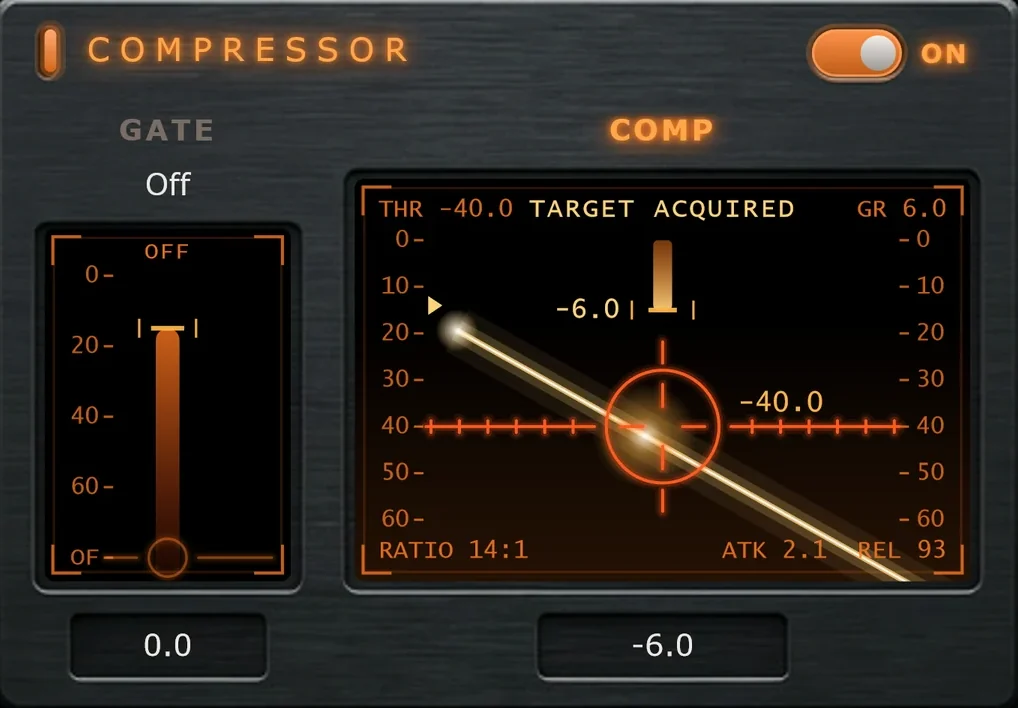
- 1THR: the threshold you set with the fader.
- 2GR: gain reduction right now, in dB.
- 3RATIO: the ratio the compressor is actually running at.
- 4ATK / REL: the attack and release it's actually running at.
- 5Gain-reduction meter. It hangs from the top: further down means more compression. Full height is 24 dB.
- 6The caret on the left is what the detector hears.
- 7Every bite fires a laser across the sights. Deeper reduction fires more often.
- 8The Gate screen. Its beam is the input level.
- 9The threshold readout. The box under the Gate screen shows the gate's.
Comp
Drag the sights down for more compression.
The Comp screen is a targeting sight, and the sights are the threshold. Pulling them down does more than lower the threshold: it also raises the ratio and quickens the attack and release, starting from the values set in the Advanced drawer. With Auto Makeup on, makeup gain rises with the compression, so the sound gets denser and louder at every step of the travel, not just quieter.
The screen's corners always show what the compressor is actually running at. When nothing is being compressed it reads SCANNING; when it bites, TARGET ACQUIRED.
Range limits the compression. Range in the Advanced drawer caps how much gain reduction the compressor may apply. Its default is 6 dB. If pulling Comp further down stops making a difference, raise Range.
Gate
Fades out what falls under the sights.
The gate is a soft-knee expander. Instead of chopping sound off, it gradually turns down what falls below its sights. It opens fast so the first consonant of a word survives, holds through short gaps, and closes gently so tails and breaths taper naturally.
- Drag the Gate sights up from the bottom until the gaps between notes or words drop away.
- A laser fires across the sight line each time the gate closes.
- Drag the sights all the way down to switch the gate Off. At Off it does nothing at all.
The gate listens to your input, not to what Drive and the compressor did to it. It belongs to the Compressor panel, so switching the Compressor off also switches off the gate.
On
Switches the compressor and the gate in or out.
With the panel off, both screens go dark and still.